# Panduan ANDARA Pegawai

# Masuk ke Akun ANDARA (Login)

<p class="callout info"><span style="color: rgb(0, 0, 0);"><span lang="IN">Untuk mengunjungi aplikasi ANDARA Nurul Fikri, silahkan buka link berikut ini : [https://andara.bimbelnurulfikri.id/auth/index](https://andara.bimbelnurulfikri.id/auth/index) </span></span></p>

<span style="color: rgb(0, 0, 0);"><span lang="IN">1. Pada halaman *Home,* klik **"*Login***<span lang="EN-US" style="font-size: 12.0pt; mso-bidi-font-size: 11.0pt; line-height: 150%; font-family: 'Times New Roman',serif; mso-fareast-font-family: 'Times New Roman'; mso-ansi-language: EN-US; mso-fareast-language: EN-US; mso-bidi-language: AR-SA;">**"**</span>. </span></span>

<span style="color: rgb(0, 0, 0);">![](https://images.bimbelnurulfikri.id/uploads/images/gallery/2025-02/embedded-image-9ennouhy.png)</span>

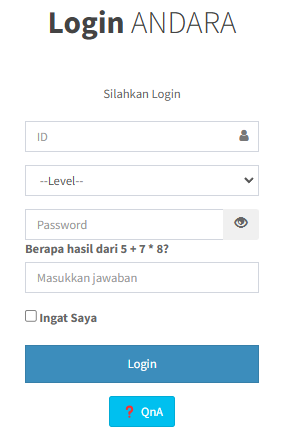
<span style="color: rgb(0, 0, 0);">2. Isilah **"form *Login*"** sesuai ketentuan di bawah dan kalau sudah klik **"*****Login"***.</span>

[![image.png](https://images.bimbelnurulfikri.id/uploads/images/gallery/2025-02/scaled-1680-/HfWimage.png)](https://images.bimbelnurulfikri.id/uploads/images/gallery/2025-02/HfWimage.png)

<table border="1" id="bkmrk-no-kolom-penjelasan-" style="border-collapse: collapse; width: 99.7619%; height: 186.594px; border-width: 1px; border-style: inset;"><colgroup><col style="width: 10.7046%;"></col><col style="width: 25.6098%;"></col><col style="width: 63.6856%;"></col></colgroup><thead><tr style="height: 29.7969px;"><td class="align-center" style="height: 29.7969px;"><span style="color: rgb(0, 0, 0);">**No**</span></td><td class="align-center" style="height: 29.7969px;"><span style="color: rgb(0, 0, 0);">**Kolom**</span></td><td class="align-center" style="height: 29.7969px;"><span style="color: rgb(0, 0, 0);">**Penjelasan**</span></td></tr></thead><tbody><tr style="height: 29.7969px;"><td style="height: 29.7969px;"><span style="color: rgb(0, 0, 0);">1</span></td><td style="height: 29.7969px;"><span style="color: rgb(0, 0, 0);">ID</span></td><td style="height: 29.7969px;"><span lang="EN-US" style="color: rgb(0, 0, 0);">ID pegawai yang terdaftar di SIKOCLOUD</span>

</td></tr><tr style="height: 32px;"><td style="height: 32px;"><span style="color: rgb(0, 0, 0);">2</span></td><td style="height: 32px;"><span style="color: rgb(0, 0, 0);">-- Level --</span></td><td style="height: 32px;"><span lang="EN-US" style="color: rgb(0, 0, 0);">Status anda di Nurul Fikri, pilih **“Pegawai”**</span>

</td></tr><tr style="height: 32px;"><td style="height: 32px;"><span style="color: rgb(0, 0, 0);">3</span></td><td style="height: 32px;"><span style="color: rgb(0, 0, 0);">Password</span></td><td style="height: 32px;"><span lang="EN-US" style="color: rgb(0, 0, 0);">Password yang sama seperti di SIKOCLOUD</span>

</td></tr><tr style="height: 32px;"><td style="height: 32px;"><span style="color: rgb(0, 0, 0);">4</span></td><td style="height: 32px;"><span style="color: rgb(0, 0, 0);">Pertanyaan Captcha</span></td><td style="height: 32px;"><span lang="EN-US" style="color: rgb(0, 0, 0);">Untuk memecahkan kode captcha, anda bisa menggunakan **kalkulator**</span>

</td></tr><tr style="height: 31px;"><td style="height: 31px;"><span style="color: rgb(0, 0, 0);">5</span></td><td style="height: 31px;"><span style="color: rgb(0, 0, 0);">Ingat Saya</span></td><td style="height: 31px;"><span lang="EN-US" style="color: rgb(0, 0, 0);">Centanglah agar **ID** dan **Password** tersimpan otomatis di browser Anda **(opsional)**</span>

</td></tr></tbody></table>

<span style="color: rgb(0, 0, 0);">3. Pada **"form *Login"***, Anda juga dapat melihat pertanyaan-pertanyaan yang sering ditanyakan pada **"QnA"** atau klik **"*****Login*****"** untuk masuk ke sistem ANDARA.</span>

<span style="color: rgb(0, 0, 0);"></span>

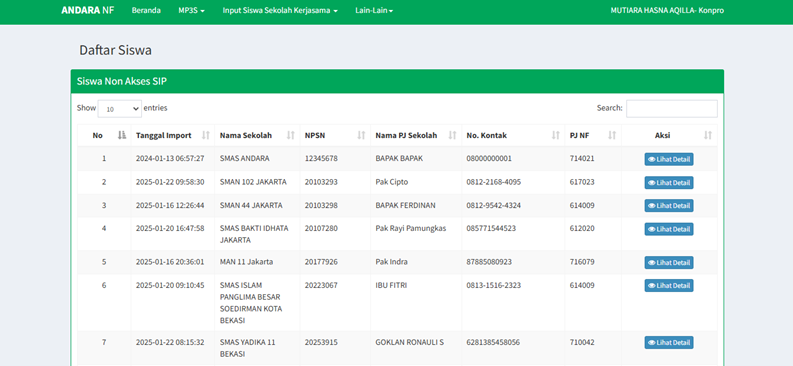
<p class="callout success"><span style="color: rgb(0, 0, 0);">Selamat, anda telah berhasil masuk ke sistem ANDARA!</span></p>

![](https://images.bimbelnurulfikri.id/uploads/images/gallery/2025-02/embedded-image-hgvti5m0.png)

# Daftar Siswa Kerjasama


# Mengedit Detail Siswa Sekolah Kerjasama

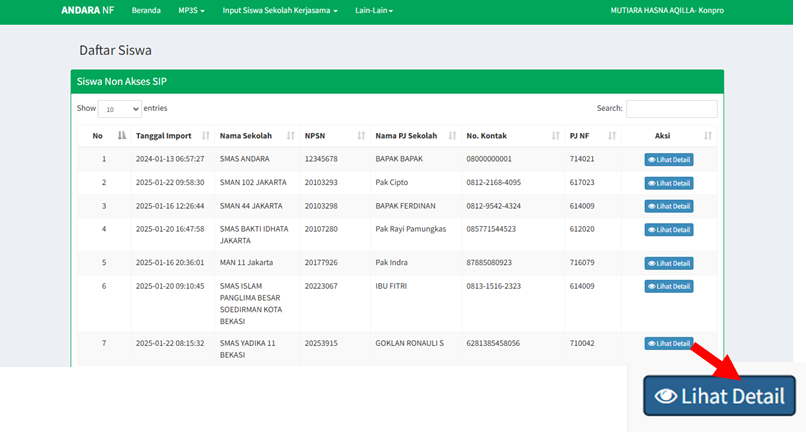
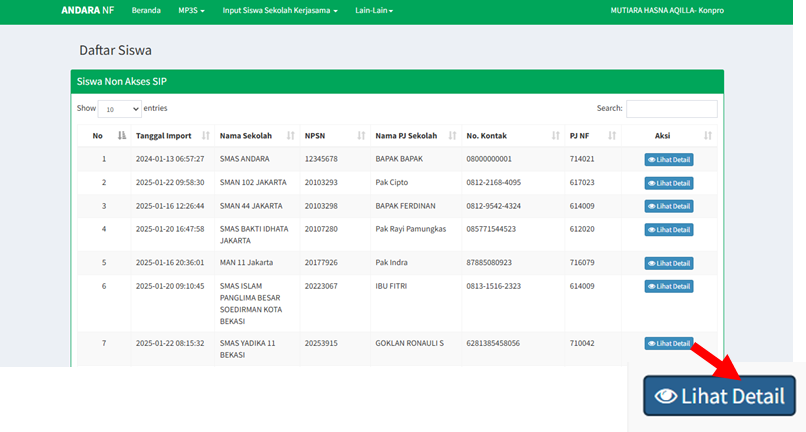
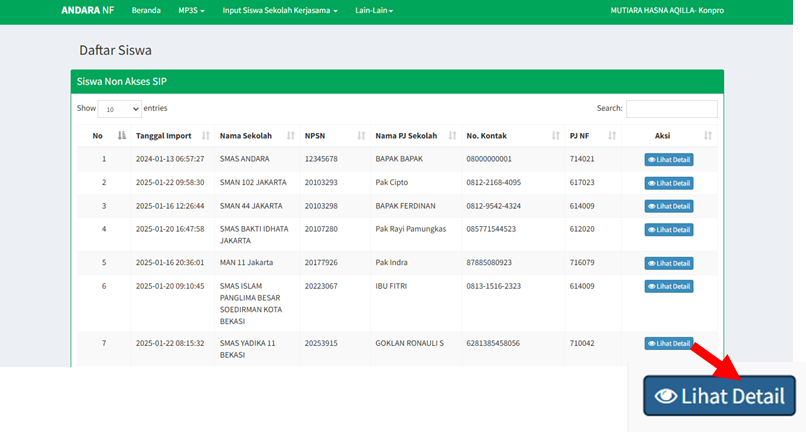
<span style="color: rgb(0, 0, 0);">1. Masih di halaman Beranda, klik **"Lihat Detail"** pada salah satu siswa.</span>

<span style="color: rgb(0, 0, 0);">![](https://images.bimbelnurulfikri.id/uploads/images/gallery/2025-02/embedded-image-pmezw3cd.png)</span>

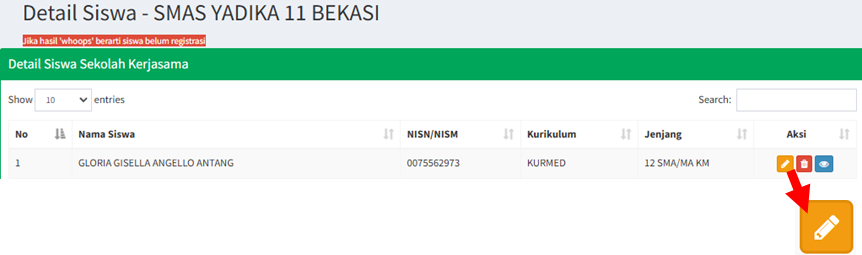
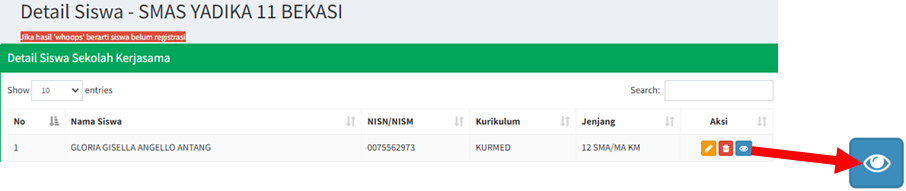
<span style="color: rgb(0, 0, 0);">2. Klik ikon berikut ini.</span>

<span style="color: rgb(0, 0, 0);">![](https://images.bimbelnurulfikri.id/uploads/images/gallery/2025-02/embedded-image-jabxra68.png)</span>

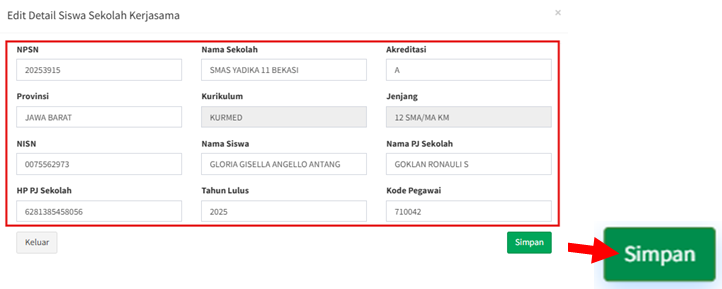
<span style="color: rgb(0, 0, 0);">3. Sesuaikan semua data pada form dengan benar sesuai kriteria yang ditentukan, lalu klik **"Simpan"**.</span>

<span style="color: rgb(0, 0, 0);">![](https://images.bimbelnurulfikri.id/uploads/images/gallery/2025-02/embedded-image-y99qrip7.png)</span>

<table border="1" id="bkmrk-no-kolom-penjelasan-" style="border-collapse: collapse; width: 99.7619%; height: 466.563px; border-width: 1px; border-style: inset;"><colgroup><col style="width: 10.7046%;"></col><col style="width: 25.6098%;"></col><col style="width: 63.6856%;"></col></colgroup><thead><tr style="height: 29.7969px;"><td class="align-center" style="height: 29.7969px;"><span style="color: rgb(0, 0, 0);">**No**</span></td><td class="align-center" style="height: 29.7969px;"><span style="color: rgb(0, 0, 0);">**Kolom**</span></td><td class="align-center" style="height: 29.7969px;"><span style="color: rgb(0, 0, 0);">**Penjelasan**</span></td></tr></thead><tbody><tr style="height: 49.9844px;"><td style="height: 49.9844px;"><span style="color: rgb(0, 0, 0);">1</span></td><td style="height: 49.9844px;"><span style="color: rgb(0, 0, 0);">NPSN</span></td><td style="height: 49.9844px;"><span style="color: rgb(0, 0, 0);">Anda bisa mencari semua NPSN Sekolah Kerjasama di</span>  
<span style="color: rgb(0, 0, 0);">[https://dapo.dikdasmen.go.id/](https://dapo.dikdasmen.go.id/) </span></td></tr><tr style="height: 32px;"><td style="height: 32px;"><span style="color: rgb(0, 0, 0);">2</span></td><td style="height: 32px;"><span style="color: rgb(0, 0, 0);">Nama Sekolah</span></td><td style="height: 32px;"><span style="color: rgb(0, 0, 0);">Nama sekolah kerjasama</span></td></tr><tr style="height: 32px;"><td style="height: 32px;"><span style="color: rgb(0, 0, 0);">3</span></td><td style="height: 32px;"><span style="color: rgb(0, 0, 0);">Akreditasi</span></td><td style="height: 32px;"><span style="color: rgb(0, 0, 0);">Akreditasi sekolah kerjasama</span></td></tr><tr style="height: 32px;"><td style="height: 32px;"><span style="color: rgb(0, 0, 0);">4</span></td><td style="height: 32px;"><span style="color: rgb(0, 0, 0);">Provinsi</span></td><td style="height: 32px;"><span style="color: rgb(0, 0, 0);">Provinsi sekolah kerjasama</span></td></tr><tr style="height: 31px;"><td style="height: 31px;"><span style="color: rgb(0, 0, 0);">5</span></td><td style="height: 31px;"><span style="color: rgb(0, 0, 0);">Kurikulum</span></td><td style="height: 31px;"><span style="color: rgb(0, 0, 0);">Kurikulum sekolah kerjasama (**Kurikulum 2013/Kurikulum Merdeka**)</span></td></tr><tr style="height: 29.7969px;"><td style="height: 29.7969px;"><span style="color: rgb(0, 0, 0);">6</span></td><td style="height: 29.7969px;"><span style="color: rgb(0, 0, 0);">Jenjang</span></td><td style="height: 29.7969px;"><span lang="EN-US" style="color: rgb(0, 0, 0);">Jenjang pendidikan yang saat ini ditempuh oleh siswa (**SD/SMP/SMA/MA/SMK**)</span>

</td></tr><tr style="height: 73.3906px;"><td style="height: 73.3906px;"><span style="color: rgb(0, 0, 0);">7</span></td><td style="height: 73.3906px;"><span style="color: rgb(0, 0, 0);">NISN</span></td><td style="height: 73.3906px;"><span lang="EN-US" style="color: rgb(0, 0, 0);">Anda bisa mencari semua NISN siswa dari sekolah yang anda sudah isi NPSN sebelumnya di  
[https://nisn.data.kemdikbud.go.id/](https://nisn.data.kemdikbud.go.id/) </span>

</td></tr><tr style="height: 32px;"><td style="height: 32px;"><span style="color: rgb(0, 0, 0);">8</span></td><td style="height: 32px;"><span style="color: rgb(0, 0, 0);">Nama Siswa</span></td><td style="height: 32px;"><span lang="EN-US" style="color: rgb(0, 0, 0);">Nama siswa yang bersangkutan</span>

</td></tr><tr style="height: 32px;"><td style="height: 32px;"><span style="color: rgb(0, 0, 0);">9</span></td><td style="height: 32px;"><span style="color: rgb(0, 0, 0);">Nama PJ Sekolah</span></td><td style="height: 32px;"><span lang="EN-US" style="color: rgb(0, 0, 0);">Nama penanggungjawab kerjasama dari sekolah yang bersangkutan</span>

</td></tr><tr style="height: 33px;"><td style="height: 33px;"><span style="color: rgb(0, 0, 0);">10</span></td><td style="height: 33px;"><span style="color: rgb(0, 0, 0);">HP PJ Sekolah</span></td><td style="height: 33px;"><span lang="EN-US" style="color: rgb(0, 0, 0);">Nomor HP penanggungjawab kerjasama dari sekolah yang bersangkutan</span>

</td></tr><tr style="height: 29.7969px;"><td style="height: 29.7969px;"><span style="color: rgb(0, 0, 0);">11</span></td><td style="height: 29.7969px;"><span style="color: rgb(0, 0, 0);">Tahun Lulus</span></td><td style="height: 29.7969px;"><span style="color: rgb(0, 0, 0);">Tahun lulus siswa yang bersangkutan</span></td></tr><tr style="height: 29.7969px;"><td style="height: 29.7969px;"><span style="color: rgb(0, 0, 0);">12</span></td><td style="height: 29.7969px;"><span style="color: rgb(0, 0, 0);">Kode Pegawai</span></td><td style="height: 29.7969px;"><span lang="EN-US" style="color: rgb(0, 0, 0);">Kode pegawai yang terdaftar di SIKOCLOUD</span>

</td></tr></tbody></table>

<p class="callout info"><span style="color: rgb(0, 0, 0);">Jika terdapat kesalahan pengisian di bagian **"Kurikulum"** dan **"Jenjang"**, segara hubungi Tiara (Call Center TI/Polda).</span></p>

# Menghapus Detail Siswa Sekolah Kerjasama

<span style="color: rgb(0, 0, 0);">1. Masih di halaman Beranda, klik **"Lihat Detail"** pada salah satu siswa.</span>

<span style="color: rgb(0, 0, 0);">![](https://images.bimbelnurulfikri.id/uploads/images/gallery/2025-02/embedded-image-nwimxhye.png)</span>

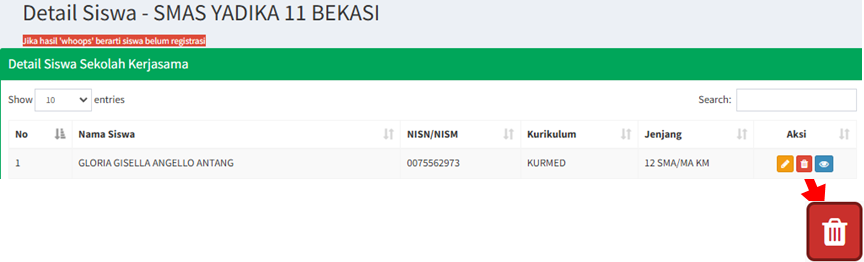
<span style="color: rgb(0, 0, 0);">2. Klik ikon berikut ini.</span>

<span style="color: rgb(0, 0, 0);">![](https://images.bimbelnurulfikri.id/uploads/images/gallery/2025-02/embedded-image-mrsgphfn.png)</span>

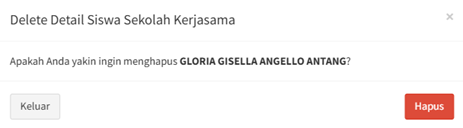
<span style="color: rgb(0, 0, 0);">3. Klik **"Hapus"**.</span>

<span style="color: rgb(0, 0, 0);">![](https://images.bimbelnurulfikri.id/uploads/images/gallery/2025-02/embedded-image-ws6bxj4l.png)</span>

# Melihat Laporan Analisis SNBP

<span style="color: rgb(0, 0, 0);">1. Masih di halaman Beranda, klik **"Lihat Detail"** pada salah satu siswa.</span>

<span style="color: rgb(0, 0, 0);">![](https://images.bimbelnurulfikri.id/uploads/images/gallery/2025-02/embedded-image-8irnmia0.png)</span>

<span style="color: rgb(0, 0, 0);">2. Klik ikon berikut ini.</span>

<span style="color: rgb(0, 0, 0);">![](https://images.bimbelnurulfikri.id/uploads/images/gallery/2025-02/embedded-image-evnlkv6u.png)</span>

<span style="color: rgb(0, 0, 0);">3. Maka anda akan diarahkan ke halaman Laporan SNBP. Pada laporan SNBP, terdiri dari beberapa bagian, yaitu:</span>

<table border="1" id="bkmrk-no-kolom-penjelasan-" style="border-collapse: collapse; width: 99.4048%; height: 247.75px; border-width: 1px; border-style: inset;"><colgroup><col style="width: 10.7046%;"></col><col style="width: 25.6098%;"></col><col style="width: 63.6856%;"></col></colgroup><thead><tr style="height: 29.7969px;"><td class="align-center" style="height: 29.7969px;"><span style="color: rgb(0, 0, 0);">**No**</span></td><td class="align-center" style="height: 29.7969px;"><span style="color: rgb(0, 0, 0);">**Kolom**</span></td><td class="align-center" style="height: 29.7969px;"><span style="color: rgb(0, 0, 0);">**Penjelasan**</span></td></tr></thead><tbody><tr style="height: 34.5938px;"><td style="height: 34.5938px;"><span style="color: rgb(0, 0, 0);">1</span></td><td style="height: 34.5938px;"><span style="color: rgb(0, 0, 0);">Identitas Siswa</span></td><td style="height: 34.5938px;"><span style="color: rgb(0, 0, 0);">Berasal dari pengisian Registrasi Siswa Kerjasama oleh pegawai</span></td></tr><tr style="height: 30.5938px;"><td style="height: 30.5938px;"><span style="color: rgb(0, 0, 0);">2</span></td><td style="height: 30.5938px;"><span style="color: rgb(0, 0, 0);">Pilihan Program Studi</span></td><td style="height: 30.5938px;"><span style="color: rgb(0, 0, 0);">Berasal dari pengisian Kartu Studi oleh siswa</span></td></tr><tr style="height: 53.375px;"><td style="height: 53.375px;"><span style="color: rgb(0, 0, 0);">3</span></td><td style="height: 53.375px;"><span style="color: rgb(0, 0, 0);">Pesaing Pada Pilihan 1</span></td><td style="height: 53.375px;"><span style="color: rgb(0, 0, 0);">Berasal dari list nama siswa yang berasal dari pengisian Kartu Studi dengan ketentuan memiliki pilihan prodi 1 sama</span></td></tr><tr style="height: 36.5938px;"><td style="height: 36.5938px;"><span style="color: rgb(0, 0, 0);">4</span></td><td style="height: 36.5938px;"><span style="color: rgb(0, 0, 0);">Analisis Nilai Akhir</span></td><td style="height: 36.5938px;"><span style="color: rgb(0, 0, 0);">Berasal dari pengisian template Pengisian Nilai Siswa Kerjasama oleh tim SMT</span></td></tr><tr style="height: 33px;"><td style="height: 33px;"><span style="color: rgb(0, 0, 0);">5</span></td><td style="height: 33px;"><span style="color: rgb(0, 0, 0);">Potensi Pilihan 1</span></td><td style="height: 33px;"><span style="color: rgb(0, 0, 0);">Berasal dari hasil analisis nilai siswa</span></td></tr><tr style="height: 29.7969px;"><td style="height: 29.7969px;"><span style="color: rgb(0, 0, 0);">6</span></td><td style="height: 29.7969px;"><span style="color: rgb(0, 0, 0);">Potensi Pilihan 2</span></td><td style="height: 29.7969px;"><span style="color: rgb(0, 0, 0);">Berasal dari hasil analisis nilai siswa</span></td></tr></tbody></table>

<p class="callout danger"><span style="color: rgb(0, 0, 0);">Jika hasil analisis pada laporan SNBP tidak muncul, artinya siswa tersebut belum memilih prodi.</span></p>

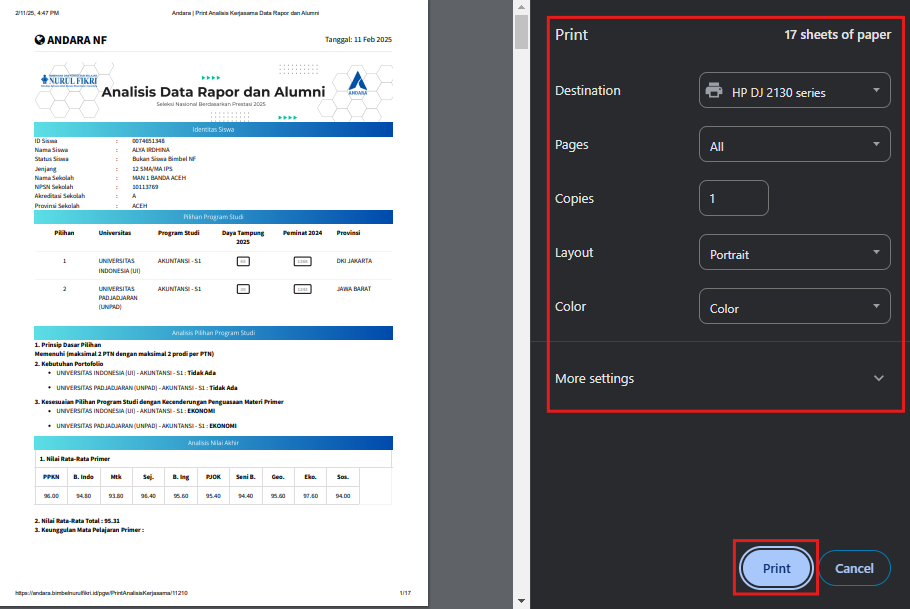
<span style="color: rgb(0, 0, 0);">4. </span><span style="color: rgb(0, 0, 0);"><span style="color: #000000;">Anda juga dapat mencetak laporan SNBP siswa. Klik </span>**"Print"**<span style="color: #000000;">.</span></span>

[![image.png](https://images.bimbelnurulfikri.id/uploads/images/gallery/2025-02/scaled-1680-/pPyimage.png)](https://images.bimbelnurulfikri.id/uploads/images/gallery/2025-02/pPyimage.png)

<span style="color: rgb(0, 0, 0);">5. Lakukanlah konfigurasi print priview sesuai kebutuhan dan kalau sudah, anda dapat menekan tombol **"Print"**.</span>

[![image.png](https://images.bimbelnurulfikri.id/uploads/images/gallery/2025-02/scaled-1680-/9xbimage.png)](https://images.bimbelnurulfikri.id/uploads/images/gallery/2025-02/9xbimage.png)

<p class="callout success"><span style="color: rgb(0, 0, 0);">Secara otomatis, laporan tersebut akan tercetak dengan sendirinya.</span></p>

# Mata Pelajaran Pendukung Program Studi (MP3S)


# Melihat Mata Pelajaran Pendukung Program Studi (MP3S)

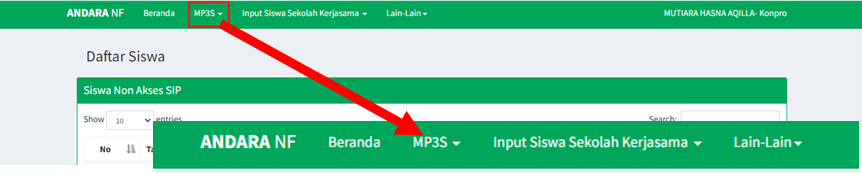
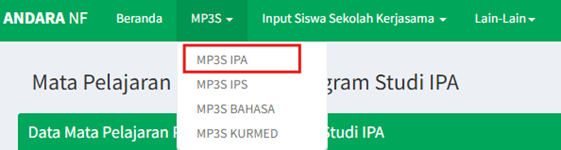
<span style="color: rgb(0, 0, 0);">1. Pada halaman Beranda, klik **"navbar MP3S"**.</span>

<span style="color: rgb(0, 0, 0);">![](https://images.bimbelnurulfikri.id/uploads/images/gallery/2025-02/embedded-image-jla1iijp.png)</span>

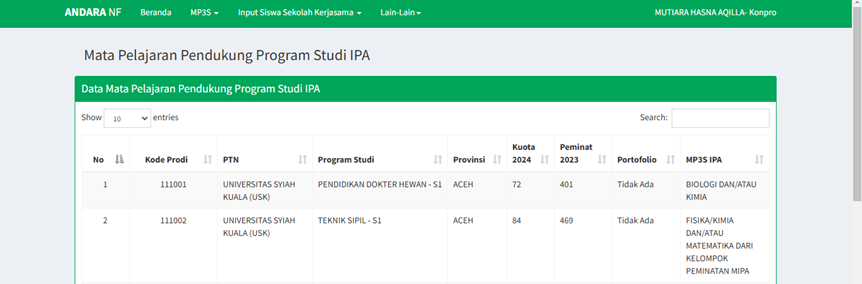
<span style="color: rgb(0, 0, 0);">2. Pilihlah salah satu **mata pelajaran yang diinginkan**, misalnya MP3S IPA.</span>

<span style="color: rgb(0, 0, 0);">![](https://images.bimbelnurulfikri.id/uploads/images/gallery/2025-02/embedded-image-aiztkomk.png)</span>

<span style="color: rgb(0, 0, 0);">3. Pada halaman ini, Anda dapat melihat daftar lengkap program studi beserta nama universitas yang tersedia untuk jurusan IPA.</span>

![](https://images.bimbelnurulfikri.id/uploads/images/gallery/2025-02/embedded-image-3s2km2ks.png)

# Input Siswa Sekolah Kerjasama


# Menambahkan Data Sekolah Kerjasama (Manual)

<p class="callout info"><span style="color: rgb(0, 0, 0);">Pengisian data sekolah kerjasama ini bisa dilakukan secara **manual** atau **otomatis**. Disarankan untuk **melakukan pengisian secara otomatis**.</span></p>

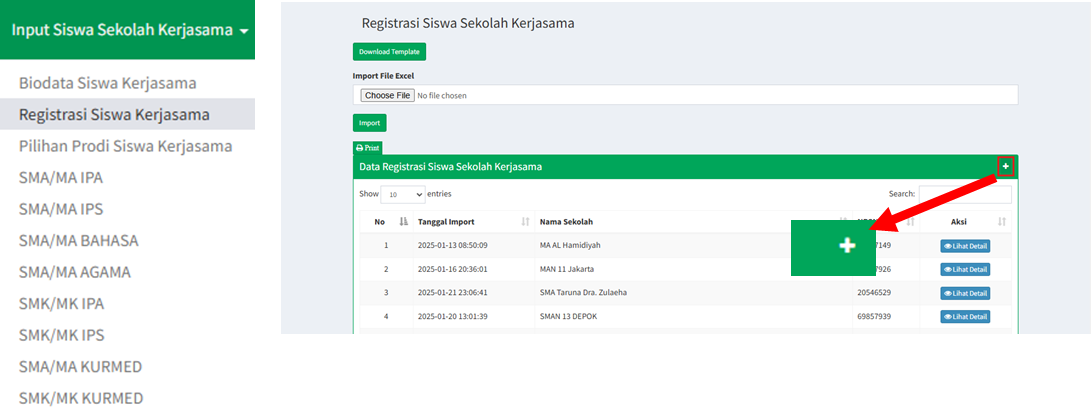
<span style="color: rgb(0, 0, 0);">1. Pada halaman Beranda, klik **"navbar Input Siswa Sekolah Kerjasama"**. </span>

<span style="color: rgb(0, 0, 0);">![](https://images.bimbelnurulfikri.id/uploads/images/gallery/2025-02/embedded-image-rjcelrgp.png)</span>

<span style="color: rgb(0, 0, 0);">2. Pilih **"menu Registrasi Siswa Kerjasama"**, lalu klik **(+)** untuk menambahkan data sekolah kerjasama.</span>

<span style="color: rgb(0, 0, 0);">![](https://images.bimbelnurulfikri.id/uploads/images/gallery/2025-02/embedded-image-pacosmwr.png)</span>

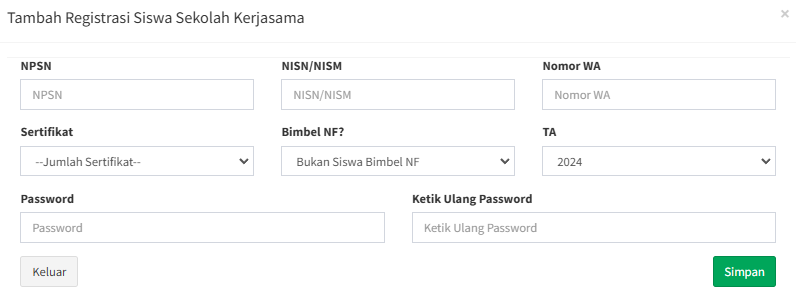
<span style="color: rgb(0, 0, 0);">3. Isilah semua data yang tertera pada **"popup Tambah Registrasi Siswa Sekolah Kerjasama"** sesuai ketentuan di bawah.</span>

[![image.png](https://images.bimbelnurulfikri.id/uploads/images/gallery/2025-02/scaled-1680-/1hcimage.png)](https://images.bimbelnurulfikri.id/uploads/images/gallery/2025-02/1hcimage.png)

<p class="callout info"><span style="color: rgb(0, 0, 0);">Pengisian form ini bisa dilakukan secara **manual dengan menginput satu per satu NISN untuk 1 sekolah kerjasama**.</span></p>

<table border="1" id="bkmrk-no-kolom-penjelasan-" style="border-collapse: collapse; width: 100.476%; height: 429.688px; border-width: 1px; border-style: inset;"><colgroup><col style="width: 10.7046%;"></col><col style="width: 25.6098%;"></col><col style="width: 63.6856%;"></col></colgroup><thead><tr style="height: 29.7969px;"><td class="align-center" style="height: 29.7969px;"><span style="color: rgb(0, 0, 0);">**No**</span></td><td class="align-center" style="height: 29.7969px;"><span style="color: rgb(0, 0, 0);">**Kolom**</span></td><td class="align-center" style="height: 29.7969px;"><span style="color: rgb(0, 0, 0);">**Penjelasan**</span></td></tr></thead><tbody><tr style="height: 54.9844px;"><td style="height: 54.9844px;"><span style="color: rgb(0, 0, 0);">1</span></td><td style="height: 54.9844px;"><span style="color: rgb(0, 0, 0);">NPSN</span></td><td style="height: 54.9844px;"><span style="color: rgb(0, 0, 0);">Anda bisa mencari semua NPSN Sekolah Kerjasama di</span>  
<span style="color: rgb(0, 0, 0);">[https://dapo.dikdasmen.go.id/](https://dapo.dikdasmen.go.id/) </span></td></tr><tr style="height: 72.9844px;"><td style="height: 72.9844px;"><span style="color: rgb(0, 0, 0);">2</span></td><td style="height: 72.9844px;"><span style="color: rgb(0, 0, 0);">NISN / NISM</span></td><td style="height: 72.9844px;"><span style="color: rgb(0, 0, 0);">Anda bisa mencari semua NISN siswa dari sekolah yang anda sudah isi NPSN sebelumnya di</span>  
<span style="color: rgb(0, 0, 0);">[https://nisn.data.kemdikbud.go.id/](https://nisn.data.kemdikbud.go.id/) </span></td></tr><tr style="height: 32.375px;"><td style="height: 32.375px;"><span style="color: rgb(0, 0, 0);">3</span></td><td style="height: 32.375px;"><span style="color: rgb(0, 0, 0);">Nomor WA</span></td><td style="height: 32.375px;"><span style="color: rgb(0, 0, 0);">Isilah dengan nomor PJ Sekolah tersebut</span></td></tr><tr style="height: 83.766px;"><td style="height: 83.766px;"><span style="color: rgb(0, 0, 0);">4</span></td><td style="height: 83.766px;"><span style="color: rgb(0, 0, 0);">Serfifikat</span></td><td style="height: 83.766px;"><span style="color: rgb(0, 0, 0);">Isilah dengan jumlah sertifikat juara dari lomba yg diikuti siswa di sekolah</span>

<span style="color: rgb(224, 62, 45);">📌 **Maksimal 3 sertifikat yang bisa di upload di web resmi ketika pendaftaran prodi SNBP.**</span>

</td></tr><tr style="height: 63.3906px;"><td style="height: 63.3906px;"><span style="color: rgb(0, 0, 0);">5</span></td><td style="height: 63.3906px;"><span style="color: rgb(0, 0, 0);">Bimbel NF</span></td><td style="height: 63.3906px;"><span style="color: rgb(0, 0, 0);">Terdapat 2 pilihan:</span>

<span style="color: rgb(0, 0, 0);">1. Siswa bimbel NF</span>  
<span style="color: rgb(0, 0, 0);">2. Bukan Siswa bimbel NF</span>

</td></tr><tr style="height: 32px;"><td style="height: 32px;"><span style="color: rgb(0, 0, 0);">6</span></td><td style="height: 32px;"><span style="color: rgb(0, 0, 0);">TA</span></td><td style="height: 32px;"><span style="color: rgb(0, 0, 0);">Isilah dengan tahun ajaran yang sedang berjalan saat ini</span></td></tr><tr style="height: 29.7969px;"><td style="height: 29.7969px;"><span style="color: rgb(0, 0, 0);">7</span></td><td style="height: 29.7969px;"><span style="color: rgb(0, 0, 0);">Password</span></td><td style="height: 29.7969px;"><span style="color: rgb(0, 0, 0);">Isilah dengan password sekolah</span></td></tr><tr style="height: 30.5938px;"><td style="height: 30.5938px;"><span style="color: rgb(0, 0, 0);">8</span></td><td style="height: 30.5938px;"><span style="color: rgb(0, 0, 0);">Ketik Ulang Password</span></td><td style="height: 30.5938px;"><span style="color: rgb(0, 0, 0);">Isilah kembali dengan password yang sudah anda masukkan sebelumnya</span>  
</td></tr></tbody></table>

<span style="color: rgb(0, 0, 0);">4. Klik **"Keluar"** untuk membatalkan pengisian data atau klik **"Simpan"** untuk menyimpan data sekolah.</span>  
<span style="color: rgb(0, 0, 0);">5. Maka, data sekolah yang sudah dimasukkan tadi tersimpan di **"tabel Data Registrasi Siswa Sekolah Kerjasama"**.</span>

![](https://images.bimbelnurulfikri.id/uploads/images/gallery/2025-02/embedded-image-ncdgpukx.png)

<p class="callout info"><span style="color: rgb(0, 0, 0);">Jika terdapat kesalahan pengisian, segara hubungi Tiara (Call Center TI/Polda).</span></p>

# Menambahkan Data Sekolah Kerjasama (Otomatis)

<p class="callout info"><span style="color: rgb(0, 0, 0);">Pengisian form ini bisa dilakukan secara otomatis dengan mengisi data sekolah sesuai template yang ada.</span></p>

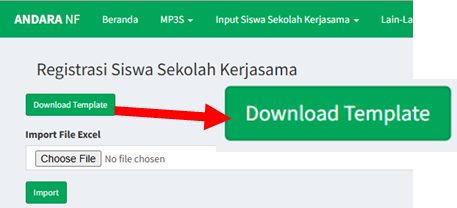
<span style="color: rgb(0, 0, 0);">1. Masih pada halaman **"menu Registrasi Siswa Kerjasama"**, klik **"Download Template"**.</span>

<span style="color: rgb(0, 0, 0);">![](https://images.bimbelnurulfikri.id/uploads/images/gallery/2025-02/embedded-image-5pjaqkmk.png)</span>

<span style="color: rgb(0, 0, 0);">2. Maka template akan terunduh secara otomatis dengan format .xlsx.</span>  
<span style="color: rgb(0, 0, 0);">3. Pada *worksheet* Microsoft Excel, isilah kolom di bawah ini berdasarkan kriteria yang telah ditentukan.</span>

<span style="color: rgb(0, 0, 0);">![](https://images.bimbelnurulfikri.id/uploads/images/gallery/2025-02/embedded-image-rwx6kd1o.png)</span>

<table border="1" id="bkmrk-no-kolom-penjelasan-" style="border-collapse: collapse; width: 96.6667%; height: 277.703px; border-width: 1px; border-style: inset;"><colgroup><col style="width: 10.7271%;"></col><col style="width: 25.6257%;"></col><col style="width: 63.6472%;"></col></colgroup><thead><tr style="height: 29.7969px;"><td class="align-center" style="height: 29.7969px;"><span style="color: rgb(0, 0, 0);">**No**</span></td><td class="align-center" style="height: 29.7969px;"><span style="color: rgb(0, 0, 0);">**Kolom**</span></td><td class="align-center" style="height: 29.7969px;"><span style="color: rgb(0, 0, 0);">**Penjelasan**</span></td></tr></thead><tbody><tr style="height: 30.9844px;"><td style="height: 30.9844px;"><span style="color: rgb(0, 0, 0);">1</span></td><td style="height: 30.9844px;"><span style="color: rgb(0, 0, 0);">id\_regist</span></td><td style="height: 30.9844px;"><span style="color: rgb(0, 0, 0);">Kode registrasi (kosongkan saja)</span></td></tr><tr style="height: 30.9844px;"><td style="height: 30.9844px;"><span style="color: rgb(0, 0, 0);">2</span></td><td style="height: 30.9844px;"><span style="color: rgb(0, 0, 0);">npsn</span></td><td style="height: 30.9844px;"><span style="color: rgb(0, 0, 0);">NPSN sekolah</span></td></tr><tr style="height: 32.375px;"><td style="height: 32.375px;"><span style="color: rgb(0, 0, 0);">3</span></td><td style="height: 32.375px;"><span style="color: rgb(0, 0, 0);">id\_siswa</span></td><td style="height: 32.375px;"><span style="color: rgb(0, 0, 0);">NISN siswa</span></td></tr><tr style="height: 29.7969px;"><td style="height: 29.7969px;"><span style="color: rgb(0, 0, 0);">4</span></td><td style="height: 29.7969px;"><span style="color: rgb(0, 0, 0);">hp</span></td><td style="height: 29.7969px;"><span style="color: rgb(0, 0, 0);">HP siswa</span></td></tr><tr style="height: 31.375px;"><td style="height: 31.375px;"><span style="color: rgb(0, 0, 0);">5</span></td><td style="height: 31.375px;"><span style="color: rgb(0, 0, 0);">sertifikat</span></td><td style="height: 31.375px;"><span style="color: rgb(0, 0, 0);">Jumlah sertifikat yang dimiliki sekolah tersebut</span></td></tr><tr style="height: 32px;"><td style="height: 32px;"><span style="color: rgb(0, 0, 0);">6</span></td><td style="height: 32px;"><span style="color: rgb(0, 0, 0);">bimbel\_nf</span></td><td style="height: 32px;"><span style="color: rgb(0, 0, 0);">Apakah siswa tersebut siswa NF atau bukan?</span></td></tr><tr style="height: 29.7969px;"><td style="height: 29.7969px;"><span style="color: rgb(0, 0, 0);">7</span></td><td style="height: 29.7969px;"><span style="color: rgb(0, 0, 0);">ta</span></td><td style="height: 29.7969px;"><span style="color: rgb(0, 0, 0);">Tahun ajaran saat ini</span></td></tr><tr style="height: 30.5938px;"><td style="height: 30.5938px;"><span style="color: rgb(0, 0, 0);">8</span></td><td style="height: 30.5938px;"><span style="color: rgb(0, 0, 0);">password</span></td><td style="height: 30.5938px;"><span style="color: rgb(0, 0, 0);">Password sekolah yang bersangkutan</span></td></tr></tbody></table>

<span style="color: rgb(0, 0, 0);">4. Jika semua sudah terisi, klik **"*Choose File*"** untuk mengunggah data siswa, lalu klik **"*Import*"**.</span>

![](https://images.bimbelnurulfikri.id/uploads/images/gallery/2025-02/embedded-image-ij6n1o2k.png)

<span style="color: rgb(0, 0, 0);">5. Maka, data sekolah yang sudah dimasukkan tadi tersimpan di **"tabel Data Registrasi Siswa Sekolah Kerjasama"**.</span>

![](https://images.bimbelnurulfikri.id/uploads/images/gallery/2025-02/embedded-image-kuqm5dvy.png)

<p class="callout info"><span style="color: rgb(0, 0, 0);">Jika terdapat kesalahan pengisian, segara hubungi Tiara (Call Center TI/Polda).</span></p>

# Memilih Prodi Siswa Sekolah Kerjasama (Manual)

<p class="callout danger align-center">**<span style="color: rgb(0, 0, 0);">!! FITUR MASIH DALAM TAHAP PENGEMBANGAN !!</span>**</p>

# Memilih Prodi Siswa Sekolah Kerjasama (Otomatis)

<p class="callout info"><span style="color: rgb(0, 0, 0);">Pengisian form ini bisa dilakukan secara otomatis dengan mengisi data pilihan prodi sesuai template yang ada.</span></p>

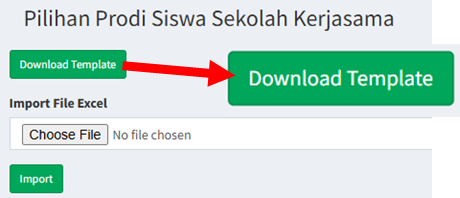
<span style="color: rgb(0, 0, 0);">1. Masih pada halaman **"menu Pilihan Prodi Siswa Kerjasama"**, klik **"Download Template"**.</span>

![](https://images.bimbelnurulfikri.id/uploads/images/gallery/2025-02/embedded-image-2mg8or1d.png)

<span style="color: rgb(0, 0, 0);">2. Maka template akan terunduh secara otomatis dengan format .xlsx.</span>  
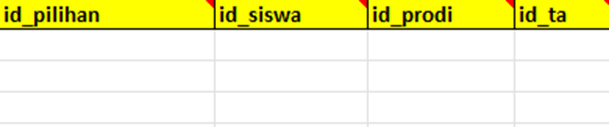
<span style="color: rgb(0, 0, 0);">3. Pada *worksheet* Microsoft Excel, isilah kolom di bawah ini berdasarkan kriteria yang telah ditentukan.</span>

![](https://images.bimbelnurulfikri.id/uploads/images/gallery/2025-02/embedded-image-5bu5ev4z.png)

<table border="1" id="bkmrk-no-kolom-penjelasan-" style="border-collapse: collapse; width: 96.6667%; height: 277.703px; border-width: 1px; border-style: inset;"><colgroup><col style="width: 10.7271%;"></col><col style="width: 25.6257%;"></col><col style="width: 63.6472%;"></col></colgroup><thead><tr style="height: 29.7969px;"><td class="align-center" style="height: 29.7969px;"><span style="color: rgb(0, 0, 0);">**No**</span></td><td class="align-center" style="height: 29.7969px;"><span style="color: rgb(0, 0, 0);">**Kolom**</span></td><td class="align-center" style="height: 29.7969px;"><span style="color: rgb(0, 0, 0);">**Penjelasan**</span></td></tr></thead><tbody><tr style="height: 30.9844px;"><td style="height: 30.9844px;"><span style="color: rgb(0, 0, 0);">1</span></td><td style="height: 30.9844px;"><span style="color: rgb(0, 0, 0);">id\_pilihan</span></td><td style="height: 30.9844px;"><span style="color: rgb(0, 0, 0);">Kode pilihan (kosongkan saja)</span></td></tr><tr style="height: 30.9844px;"><td style="height: 30.9844px;"><span style="color: rgb(0, 0, 0);">2</span></td><td style="height: 30.9844px;"><span style="color: rgb(0, 0, 0);">id\_siswa</span></td><td style="height: 30.9844px;"><span style="color: rgb(0, 0, 0);">NISN siswa</span></td></tr><tr style="height: 32.375px;"><td style="height: 32.375px;"><span style="color: rgb(0, 0, 0);">3</span></td><td style="height: 32.375px;"><span style="color: rgb(0, 0, 0);">id\_prodi</span></td><td style="height: 32.375px;"><span style="color: rgb(0, 0, 0);">Kode program studi (**dapat dilihat pada "navbar Kode Prodi"**</span></td></tr><tr style="height: 29.7969px;"><td style="height: 29.7969px;"><span style="color: rgb(0, 0, 0);">4</span></td><td style="height: 29.7969px;"><span style="color: rgb(0, 0, 0);">id\_ta</span></td><td style="height: 29.7969px;"><span style="color: rgb(0, 0, 0);">Tahun ajaran saat ini</span></td></tr></tbody></table>

<span style="color: rgb(0, 0, 0);">4. Jika semua sudah terisi, klik **"*Choose File*"** untuk mengunggah data siswa, lalu klik **"*Import*"**.</span>

![](https://images.bimbelnurulfikri.id/uploads/images/gallery/2025-02/embedded-image-ij6n1o2k.png)

<span style="color: rgb(0, 0, 0);">5. Maka, data sekolah yang sudah dimasukkan tadi tersimpan di **"tabel Data Pilihan Prodi Siswa Sekolah Kerjasama"**.</span>

<span style="color: rgb(0, 0, 0);">![](https://images.bimbelnurulfikri.id/uploads/images/gallery/2025-02/embedded-image-vv75tt1v.png)</span>

<span style="color: rgb(0, 0, 0);">6. Pilih salah satu sekolah, lalu klik **"Lihat Detail"** untuk melihat semua data siswa di sekolah tersebut.</span><span style="color: rgb(0, 0, 0);">. </span>

<span style="color: rgb(0, 0, 0);">7. Anda dapat menghapus nama siswa pada **"tabel Siswa Sudah Memiliki Prodi Sekolah Kerjasama"** dengan cara mengklik ikon di bawah ini.</span>

[![image.png](https://images.bimbelnurulfikri.id/uploads/images/gallery/2025-02/scaled-1680-/2oKimage.png)](https://images.bimbelnurulfikri.id/uploads/images/gallery/2025-02/2oKimage.png)

# Mengunggah Nilai Siswa Setiap Jenjang

<span style="color: rgb(0, 0, 0);">1. Pada halaman Beranda, klik **"navbar Input Siswa Sekolah Kerjasama"**. </span>

<span style="color: rgb(0, 0, 0);">![](https://images.bimbelnurulfikri.id/uploads/images/gallery/2025-02/embedded-image-rjcelrgp.png)</span>

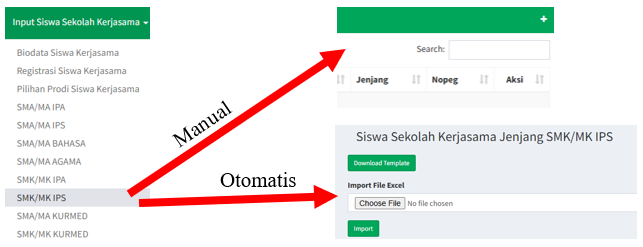
<span style="color: rgb(0, 0, 0);">2. Pilih jenjang, misalnya SMK/MK IPS, lalu masukkan data secara otomatis atau manual.</span>

<p class="callout info"><span style="color: rgb(0, 0, 0);">Tahapan memasukkan data memiliki **kesamaan dengan tahapan sebelumnya**. Untuk tahapan manual dapat diakses [di sini](https://kb.bimbelnf.com/books/panduan-andara-pegawai/page/menambahkan-data-sekolah-kerjasama-manual), sementara tahapan otomatis dapat diakses [di sini](https://kb.bimbelnf.com/books/panduan-andara-pegawai/page/menambahkan-data-sekolah-kerjasama-otomatis).</span></p>

[![image.png](https://images.bimbelnurulfikri.id/uploads/images/gallery/2025-02/scaled-1680-/zz4image.png)](https://images.bimbelnurulfikri.id/uploads/images/gallery/2025-02/zz4image.png)

<span style="color: rgb(0, 0, 0);">3. Untuk tahap otomatis, isilah kolom di bawah ini pada *worksheet* Microsoft Excel sesuai dengan kriteria yang telah ditentukan</span>

[![image.png](https://images.bimbelnurulfikri.id/uploads/images/gallery/2025-02/scaled-1680-/Docimage.png)](https://images.bimbelnurulfikri.id/uploads/images/gallery/2025-02/Docimage.png)

<table border="1" id="bkmrk-no-kolom-penjelasan-" style="border-collapse: collapse; width: 96.6667%; height: 597.485px; border-width: 1px; border-style: inset;"><colgroup><col style="width: 10.7271%;"></col><col style="width: 25.6257%;"></col><col style="width: 63.6472%;"></col></colgroup><thead><tr style="height: 29.7969px;"><td class="align-center" style="height: 29.7969px;"><span style="color: rgb(0, 0, 0);">**No**</span></td><td class="align-center" style="height: 29.7969px;"><span style="color: rgb(0, 0, 0);">**Kolom**</span></td><td class="align-center" style="height: 29.7969px;"><span style="color: rgb(0, 0, 0);">**Penjelasan**</span></td></tr></thead><tbody><tr style="height: 34.5938px;"><td style="height: 34.5938px;"><span style="color: rgb(0, 0, 0);">1</span></td><td style="height: 34.5938px;"><span style="color: rgb(0, 0, 0);">id\_kerjasama\_mk\_ips</span></td><td style="height: 34.5938px;"><span style="color: rgb(0, 0, 0);">Kode kerjasama dari jenjang yang diambil (kosongkan saja)</span></td></tr><tr style="height: 30.9844px;"><td style="height: 30.9844px;"><span style="color: rgb(0, 0, 0);">2</span></td><td style="height: 30.9844px;"><span style="color: rgb(0, 0, 0);">id\_siswa</span></td><td style="height: 30.9844px;"><span style="color: rgb(0, 0, 0);">NISN siswa</span></td></tr><tr style="height: 32.375px;"><td style="height: 32.375px;"><span style="color: rgb(0, 0, 0);">3</span></td><td style="height: 32.375px;"><span style="color: rgb(0, 0, 0);">kode\_pegawai</span></td><td style="height: 32.375px;"><span style="color: rgb(0, 0, 0);">Nomor pegawai sesuai yang ada di SIKOCLOUD</span></td></tr><tr style="height: 34.5938px;"><td style="height: 34.5938px;"><span style="color: rgb(0, 0, 0);">4</span></td><td style="height: 34.5938px;"><span style="color: rgb(0, 0, 0);">rata\_pkn</span></td><td style="height: 34.5938px;"><span style="color: rgb(0, 0, 0);">Nilai rata-rata siswa untuk mata pelajaran pendidikan kewarganegaraan (PKN)</span></td></tr><tr style="height: 34.5938px;"><td style="height: 34.5938px;"><span style="color: rgb(0, 0, 0);">5</span></td><td style="height: 34.5938px;"><span style="color: rgb(0, 0, 0);">rata\_ind</span></td><td style="height: 34.5938px;"><span style="color: rgb(0, 0, 0);">Nilai rata-rata siswa untuk mata pelajaran Bahasa Indonesia</span></td></tr><tr style="height: 32.5938px;"><td style="height: 32.5938px;"><span style="color: rgb(0, 0, 0);">6</span></td><td style="height: 32.5938px;"><span style="color: rgb(0, 0, 0);">rata\_mat</span></td><td style="height: 32.5938px;"><span style="color: rgb(0, 0, 0);">Nilai rata-rata siswa untuk mata pelajaran matematika</span></td></tr><tr style="height: 29.7969px;"><td style="height: 29.7969px;"><span style="color: rgb(0, 0, 0);">7</span></td><td style="height: 29.7969px;"><span style="color: rgb(0, 0, 0);">rata\_sej</span></td><td style="height: 29.7969px;"><span style="color: rgb(0, 0, 0);">Nilai rata-rata siswa untuk mata pelajaran sejarah</span></td></tr><tr style="height: 33.5938px;"><td style="height: 33.5938px;"><span style="color: rgb(0, 0, 0);">8</span></td><td style="height: 33.5938px;"><span style="color: rgb(0, 0, 0);">rata\_ing</span></td><td style="height: 33.5938px;"><span style="color: rgb(0, 0, 0);">Nilai rata-rata siswa untuk mata pelajaran Bahasa Inggris</span></td></tr><tr style="height: 32.5938px;"><td style="height: 32.5938px;"><span style="color: rgb(0, 0, 0);">9</span></td><td style="height: 32.5938px;"><span style="color: rgb(0, 0, 0);">rata\_sen</span></td><td style="height: 32.5938px;"><span style="color: rgb(0, 0, 0);">Nilai rata-rata siswa untuk mata pelajaran seni budaya</span></td></tr></tbody></table>

[![image.png](https://images.bimbelnurulfikri.id/uploads/images/gallery/2025-02/scaled-1680-/0z4image.png)](https://images.bimbelnurulfikri.id/uploads/images/gallery/2025-02/0z4image.png)

<table border="1" id="bkmrk-10-rata_pjok-nilai-r" style="border-collapse: collapse; width: 96.6667%; height: 597.485px; border-width: 1px; border-style: inset;"><colgroup><col style="width: 10.7271%;"></col><col style="width: 25.6257%;"></col><col style="width: 63.6472%;"></col></colgroup><thead></thead><tbody><tr style="height: 29.7969px;"><td style="height: 29.7969px;"><span style="color: rgb(0, 0, 0);">10</span></td><td style="height: 29.7969px;"><span style="color: rgb(0, 0, 0);">rata\_pjok</span></td><td style="height: 29.7969px;"><span style="color: rgb(0, 0, 0);">Nilai rata-rata siswa untuk mata pelajaran olahraga</span></td></tr><tr style="height: 29.7969px;"><td style="height: 29.7969px;"><span style="color: rgb(0, 0, 0);">11</span></td><td style="height: 29.7969px;"><span style="color: rgb(0, 0, 0);">rata\_seluruh</span></td><td style="height: 29.7969px;"><span style="color: rgb(0, 0, 0);">Rata-rata nilai siswa untuk semua mata pelajaran</span></td></tr><tr style="height: 46.5938px;"><td style="height: 46.5938px;"><span style="color: rgb(0, 0, 0);">12</span></td><td style="height: 46.5938px;"><span style="color: rgb(0, 0, 0);">rank\_eligible</span></td><td style="height: 46.5938px;"><span style="color: rgb(0, 0, 0);">Peringkat yang didapat siswa dalam ranking paralel di suatu sekolah untuk setiap program studi</span></td></tr><tr style="height: 46.5938px;"><td style="height: 46.5938px;"><span style="color: rgb(0, 0, 0);">13</span></td><td style="height: 46.5938px;"><span style="color: rgb(0, 0, 0);">jml\_eligible\_jurusan</span></td><td style="height: 46.5938px;"><span style="color: rgb(0, 0, 0);">Jumlah siswa yang mengambil suatu prodi </span></td></tr><tr style="height: 29.7969px;"><td style="height: 29.7969px;"><span style="color: rgb(0, 0, 0);">14</span></td><td style="height: 29.7969px;"><span style="color: rgb(0, 0, 0);">jml\_eligible\_all</span></td><td style="height: 29.7969px;"><span style="color: rgb(0, 0, 0);">Jumlah siswa yang masuk ke dalam ranking parallel di suatu sekolah </span></td></tr><tr style="height: 29.7969px;"><td style="height: 29.7969px;"><span style="color: rgb(0, 0, 0);">15</span></td><td style="height: 29.7969px;"><span style="color: rgb(0, 0, 0);">jml\_alumni\_snbp</span></td><td style="height: 29.7969px;"><span style="color: rgb(0, 0, 0);">Jumlah alumni sekolah tersebut yang lolos SNBP pada tahun ajaran ini</span></td></tr><tr style="height: 29.7969px;"><td style="height: 29.7969px;"><span style="color: rgb(0, 0, 0);">16</span></td><td style="height: 29.7969px;"><span style="color: rgb(0, 0, 0);">kode\_struktur</span></td><td style="height: 29.7969px;"> </td></tr><tr style="height: 29.7969px;"><td style="height: 29.7969px;"><span style="color: rgb(0, 0, 0);">17</span></td><td style="height: 29.7969px;"><span style="color: rgb(0, 0, 0);">ta</span></td><td style="height: 29.7969px;"><span style="color: rgb(0, 0, 0);">Tahun ajaran saat ini</span></td></tr></tbody></table>

<span style="color: rgb(0, 0, 0);">4. Jika semua sudah terisi, klik **"*Choose File*"** untuk mengunggah data siswa, lalu klik **"*Import*"**.</span>

![](https://images.bimbelnurulfikri.id/uploads/images/gallery/2025-02/embedded-image-ij6n1o2k.png)

<span style="color: rgb(0, 0, 0);">5. Maka, data sekolah yang sudah dimasukkan tadi tersimpan di **"tabel Data Siswa Sekolah Kerjasama Jenjang SMK/MK IPS"**.</span>

![](https://images.bimbelnurulfikri.id/uploads/images/gallery/2025-02/embedded-image-vkuvrzcb.png)

# Lain-Lain (Seputar SNBP)


# Mengunggah Data Kelulusan Siswa

<span style="color: rgb(0, 0, 0);">1. Pada halaman Beranda, klik **"navbar Lain-Lain"**. </span>

<span style="color: rgb(0, 0, 0);">![](https://images.bimbelnurulfikri.id/uploads/images/gallery/2025-02/embedded-image-g6ngkwc9.png)</span>

<span style="color: rgb(0, 0, 0);">2. Pilih **"menu Kelulusan Eksternal"** **=&gt; "Download Template" =&gt;** Maka template akan terunduh secara otomatis dengan format .xlsx.</span>

![](https://images.bimbelnurulfikri.id/uploads/images/gallery/2025-02/embedded-image-cj6yysym.png)

<span style="color: rgb(0, 0, 0);">3. Pada *worksheet* Microsoft Excel, isilah kolom di bawah ini berdasarkan kriteria yang telah ditentukan.</span>

[![image.png](https://images.bimbelnurulfikri.id/uploads/images/gallery/2025-02/scaled-1680-/sgNimage.png)](https://images.bimbelnurulfikri.id/uploads/images/gallery/2025-02/sgNimage.png)

<table border="1" id="bkmrk-no-kolom-penjelasan-" style="border-collapse: collapse; width: 96.6667%; height: 277.703px; border-width: 1px; border-style: inset;"><colgroup><col style="width: 10.7271%;"></col><col style="width: 25.6257%;"></col><col style="width: 63.6472%;"></col></colgroup><thead><tr style="height: 29.7969px;"><td class="align-center" style="height: 29.7969px;"><span style="color: rgb(0, 0, 0);">**No**</span></td><td class="align-center" style="height: 29.7969px;"><span style="color: rgb(0, 0, 0);">**Kolom**</span></td><td class="align-center" style="height: 29.7969px;"><span style="color: rgb(0, 0, 0);">**Penjelasan**</span></td></tr></thead><tbody><tr style="height: 30.9844px;"><td style="height: 30.9844px;"><span style="color: rgb(0, 0, 0);">1</span></td><td style="height: 30.9844px;"><span style="color: rgb(0, 0, 0);">id</span></td><td style="height: 30.9844px;"><span style="color: rgb(0, 0, 0);">ID unik siswa (kosongkan saja)</span></td></tr><tr style="height: 30.9844px;"><td style="height: 30.9844px;"><span style="color: rgb(0, 0, 0);">2</span></td><td style="height: 30.9844px;"><span style="color: rgb(0, 0, 0);">nama</span></td><td style="height: 30.9844px;"><span style="color: rgb(0, 0, 0);">Nama siswa</span></td></tr><tr style="height: 32.375px;"><td style="height: 32.375px;"><span style="color: rgb(0, 0, 0);">3</span></td><td style="height: 32.375px;"><span style="color: rgb(0, 0, 0);">kelas</span></td><td style="height: 32.375px;"><span style="color: rgb(0, 0, 0);">Kelas siswa saat ini</span></td></tr><tr style="height: 29.7969px;"><td style="height: 29.7969px;"><span style="color: rgb(0, 0, 0);">4</span></td><td style="height: 29.7969px;"><span style="color: rgb(0, 0, 0);">kode\_prodi</span></td><td style="height: 29.7969px;"><span style="color: rgb(0, 0, 0);">Kode program studi (**dapat dilihat pada "navbar Kode Prodi"**)</span></td></tr><tr style="height: 31.375px;"><td style="height: 31.375px;"><span style="color: rgb(0, 0, 0);">5</span></td><td style="height: 31.375px;"><span style="color: rgb(0, 0, 0);">diterima\_di\_ptn</span></td><td style="height: 31.375px;"><span style="color: rgb(0, 0, 0);">Nama universitas siswa yang dinyatakan lolos SNBP</span></td></tr><tr style="height: 32px;"><td style="height: 32px;"><span style="color: rgb(0, 0, 0);">6</span></td><td style="height: 32px;"><span style="color: rgb(0, 0, 0);">jurusan</span></td><td style="height: 32px;"><span style="color: rgb(0, 0, 0);">Nama jurusan/program studi siswa yang dinyatakan lolos SNBP</span></td></tr><tr style="height: 29.7969px;"><td style="height: 29.7969px;"><span style="color: rgb(0, 0, 0);">7</span></td><td style="height: 29.7969px;"><span style="color: rgb(0, 0, 0);">jenjang</span></td><td style="height: 29.7969px;"><span style="color: rgb(0, 0, 0);">Jenjang prodi atau jurusan siswa yang dinyatakan lolos SNBP (**D1/D3/S1**)</span></td></tr><tr style="height: 30.5938px;"><td style="height: 30.5938px;"><span style="color: rgb(0, 0, 0);">8</span></td><td style="height: 30.5938px;"><span style="color: rgb(0, 0, 0);">kelompok</span></td><td style="height: 30.5938px;"><span style="color: rgb(0, 0, 0);">Kelompok program studi (**IPA/IPS)**</span></td></tr><tr><td><span style="color: rgb(0, 0, 0);">9</span></td><td><span style="color: rgb(0, 0, 0);">npsn</span></td><td><span style="color: rgb(0, 0, 0);">NPSN siswa</span></td></tr><tr><td><span style="color: rgb(0, 0, 0);">10</span></td><td><span style="color: rgb(0, 0, 0);">sekolah</span></td><td><span style="color: rgb(0, 0, 0);">Nama sekolah siswa yang bersangkutan</span></td></tr><tr><td><span style="color: rgb(0, 0, 0);">11</span></td><td><span style="color: rgb(0, 0, 0);">lulus</span></td><td><span style="color: rgb(0, 0, 0);">Status dinyatakan lolos SNBP atau tidak</span></td></tr></tbody></table>

[![image.png](https://images.bimbelnurulfikri.id/uploads/images/gallery/2025-02/scaled-1680-/dWjimage.png)](https://images.bimbelnurulfikri.id/uploads/images/gallery/2025-02/dWjimage.png)

<table border="1" id="bkmrk-no-kolom-penjelasan--1" style="border-collapse: collapse; width: 96.6667%; height: 153.938px; border-width: 1px; border-style: inset;"><colgroup><col style="width: 10.7271%;"></col><col style="width: 25.6257%;"></col><col style="width: 63.6472%;"></col></colgroup><thead><tr style="height: 29.7969px;"><td class="align-center" style="height: 29.7969px;"><span style="color: rgb(0, 0, 0);">**No**</span></td><td class="align-center" style="height: 29.7969px;"><span style="color: rgb(0, 0, 0);">**Kolom**</span></td><td class="align-center" style="height: 29.7969px;"><span style="color: rgb(0, 0, 0);">**Penjelasan**</span></td></tr></thead><tbody><tr style="height: 30.9844px;"><td style="height: 30.9844px;"><span style="color: rgb(0, 0, 0);">12</span></td><td style="height: 30.9844px;"><span style="color: rgb(0, 0, 0);">rank\_eligible</span></td><td style="height: 30.9844px;"><span style="color: rgb(0, 0, 0);">Urutan ranking siswa di sekolah secara paralel</span></td></tr><tr style="height: 30.9844px;"><td style="height: 30.9844px;"><span style="color: rgb(0, 0, 0);">13</span></td><td style="height: 30.9844px;"><span style="color: rgb(0, 0, 0);">rata-rata</span></td><td style="height: 30.9844px;"><span style="color: rgb(0, 0, 0);">Nilai rata-rata siswa</span></td></tr><tr style="height: 32.375px;"><td style="height: 32.375px;"><span style="color: rgb(0, 0, 0);">14</span></td><td style="height: 32.375px;"><span style="color: rgb(0, 0, 0);">provinsi\_sekolah</span></td><td style="height: 32.375px;"><span style="color: rgb(0, 0, 0);">Nama provinsi sekolah kerjasama</span></td></tr><tr style="height: 29.7969px;"><td style="height: 29.7969px;"><span style="color: rgb(0, 0, 0);">15</span></td><td style="height: 29.7969px;"><span style="color: rgb(0, 0, 0);">provinsi\_ptn</span></td><td style="height: 29.7969px;"><span style="color: rgb(0, 0, 0);">Nama provinsi universitas yang dinyatakan lolos SNBP</span></td></tr></tbody></table>

[![image.png](https://images.bimbelnurulfikri.id/uploads/images/gallery/2025-02/scaled-1680-/xw3image.png)](https://images.bimbelnurulfikri.id/uploads/images/gallery/2025-02/xw3image.png)

> <span style="color: rgb(0, 0, 0);">Terdapat aturan khusus untuk keempat kolom diatas</span>
> 
> **<span style="color: rgb(224, 62, 45);">📌 Jika di sekolahnya masih menerapkan “Kurikulum 2013 (KURTILAS)” </span>**
> 
> 1. <span style="color: rgb(0, 0, 0);">**jml\_eligible\_jurusan**: jumlah siswa eligible di jurusan ipa/ips/bahasa/agama (masing " jurusan) di tahun tersebut.</span>
> 2. <span style="color: rgb(0, 0, 0);">**jml\_eligible\_angkatan**: jumlah seluruh siswa eligible disemua jurusan (ipa+ips+bahasa+agama) di tahun tersebut.</span>
> 3. <span style="color: rgb(0, 0, 0);">**jml\_eligible\_prestasi\_tahun\_lalu**: jumlah alumni yang diterima jalur prestasi (snbp) semua jurusan di tahun lalu (1 tahun lalu).</span>
> 4. <span style="color: rgb(0, 0, 0);">**jml\_eligible\_tahun\_ini**: jumlah eligible yang lulus tahun tersebut.</span>
> 
> <span style="color: rgb(224, 62, 45);">**📌 Jika di sekolahnya masih menerapkan “Kurikulum Merdeka (KURMED)”** </span>
> 
> 1. <span style="color: rgb(0, 0, 0);">**jml\_eligible\_jurusan**: jumlah seluruh siswa eligible satu angkatan di tahun 2024.</span>
> 2. <span style="color: rgb(0, 0, 0);">**jml\_eligible\_angkatan**: jumlah seluruh siswa eligible satu angkatan di tahun 2024.</span>
> 3. <span style="color: rgb(0, 0, 0);">**jml\_eligible\_prestasi\_tahun\_lalu**: jumlah alumni yang diterima jalur prestasi (SNBP) semua jurusan di tahun lalu (1 tahun lalu).</span>
> 4. <span style="color: rgb(0, 0, 0);">**jml\_eligible\_tahun\_ini**: jumlah eligible yang lulus tahun tersebut.</span>

[![image.png](https://images.bimbelnurulfikri.id/uploads/images/gallery/2025-02/scaled-1680-/JPpimage.png)](https://images.bimbelnurulfikri.id/uploads/images/gallery/2025-02/JPpimage.png)

<table border="1" id="bkmrk-no-kolom-penjelasan--2" style="border-collapse: collapse; width: 96.6667%; height: 155.156px; border-width: 1px; border-style: inset;"><colgroup><col style="width: 10.7091%;"></col><col style="width: 25.6252%;"></col><col style="width: 63.6806%;"></col></colgroup><thead><tr style="height: 29.7969px;"><td class="align-center" style="height: 29.7969px;"><span style="color: rgb(0, 0, 0);">**No**</span></td><td class="align-center" style="height: 29.7969px;"><span style="color: rgb(0, 0, 0);">**Kolom**</span></td><td class="align-center" style="height: 29.7969px;"><span style="color: rgb(0, 0, 0);">**Penjelasan**</span></td></tr></thead><tbody><tr style="height: 30.9844px;"><td style="height: 30.9844px;"><span style="color: rgb(0, 0, 0);">20</span></td><td style="height: 30.9844px;"><span style="color: rgb(0, 0, 0);">ta</span></td><td style="height: 30.9844px;"><span style="color: rgb(0, 0, 0);">Tahun ajaran saat ini</span></td></tr><tr style="height: 30.9844px;"><td style="height: 30.9844px;"><span style="color: rgb(0, 0, 0);">21</span></td><td style="height: 30.9844px;"><span style="color: rgb(0, 0, 0);">persen</span></td><td style="height: 30.9844px;"><span style="color: rgb(0, 0, 0);">Jumlah kelulusan tahun ajaran saat ini</span></td></tr><tr style="height: 63.3906px;"><td style="height: 63.3906px;"><span style="color: rgb(0, 0, 0);">22</span></td><td style="height: 63.3906px;"><span style="color: rgb(0, 0, 0);">naik\_turun</span></td><td style="height: 63.3906px;"><span style="color: rgb(0, 0, 0);">Untuk membandingkan jumlah kelulusan antar tahun</span>

**<span style="color: rgb(0, 0, 0);">📌 <span style="color: rgb(224, 62, 45);">naik </span>: </span>**<span style="color: rgb(0, 0, 0);">jika </span>**<span style="color: rgb(0, 0, 0);">lulusan tahun ini <span style="color: rgb(224, 62, 45);">lebih banyak yang diterima di PTN</span> </span>**<span style="color: rgb(0, 0, 0);">ketimbang </span>**<span style="color: rgb(0, 0, 0);">tahun lalu.  
📌 <span style="color: rgb(224, 62, 45);">turun </span>: </span>**<span style="color: rgb(0, 0, 0);">jika </span>**<span style="color: rgb(0, 0, 0);">lulusan tahun <span style="color: rgb(224, 62, 45);">kemarin lebih banyak yang diterima di PTN</span> </span>**<span style="color: rgb(0, 0, 0);">ketimbang</span>**<span style="color: rgb(0, 0, 0);"> tahun ini.</span>**

</td></tr></tbody></table>

<span style="color: rgb(0, 0, 0);">4. Jika semua sudah terisi, klik **"*Choose File*"** untuk mengunggah data siswa, lalu klik **"*Import*"**.</span>

<span style="color: rgb(0, 0, 0);">![](https://images.bimbelnurulfikri.id/uploads/images/gallery/2025-02/embedded-image-ij6n1o2k.png)</span>

<span style="color: rgb(0, 0, 0);">5. Maka, data sekolah yang sudah dimasukkan tadi tersimpan di **"tabel Data Kelulusan Eksternal"**.</span>

<span style="color: rgb(0, 0, 0);">![](https://images.bimbelnurulfikri.id/uploads/images/gallery/2025-02/embedded-image-a1ns1ee1.png)</span>

<span style="color: rgb(0, 0, 0);">6. Anda bisa melakukan *filtering* data melalui berdasarkan kelas, PTN, Prodi, Provinsi PTN, dll. Klik salah satu tombol di bawah ini, misalnya **“Toggle Prodi”**.</span>

<span style="color: rgb(0, 0, 0);">![](https://images.bimbelnurulfikri.id/uploads/images/gallery/2025-02/embedded-image-awi4sass.png)</span>

<span style="color: rgb(0, 0, 0);">7. Maka hasilnya seperti di bawah ini.</span>

**<span style="color: rgb(224, 62, 45);">SEBELUM (KOLOM PRODI MASIH ADA)</span>**

**<span style="color: rgb(224, 62, 45);">![](https://images.bimbelnurulfikri.id/uploads/images/gallery/2025-02/embedded-image-qmyyxif3.png)</span>**

**<span style="color: rgb(224, 62, 45);">SESUDAH (KOLOM PRODI MENGHILANG)</span>**

<span style="color: rgb(0, 0, 0);">![](https://images.bimbelnurulfikri.id/uploads/images/gallery/2025-02/embedded-image-ixjxa4wm.png)</span>

# Melihat Data Akreditasi PTN

<span style="color: rgb(0, 0, 0);">1. Pada halaman Beranda, klik **"navbar Lain-Lain"**. </span>

<span style="color: rgb(0, 0, 0);">![](https://images.bimbelnurulfikri.id/uploads/images/gallery/2025-02/embedded-image-g6ngkwc9.png)</span>

<span style="color: rgb(0, 0, 0);">2. Pilih **"menu Akreditasi PTN"**, maka anda akan diarahkan ke halaman di bawah ini.</span>

<span style="color: rgb(0, 0, 0);">![](https://images.bimbelnurulfikri.id/uploads/images/gallery/2025-02/embedded-image-kitisu8j.png)</span>

<span style="color: rgb(0, 0, 0);">3. Scrolling ke bawah untuk melihat semua akreditasi PTN.</span>

[![image.png](https://images.bimbelnurulfikri.id/uploads/images/gallery/2025-02/scaled-1680-/Phsimage.png)](https://images.bimbelnurulfikri.id/uploads/images/gallery/2025-02/Phsimage.png)

# Melihat Perbandingan Prodi Setiap Universitas

<span style="color: rgb(0, 0, 0);">1. Pada halaman Beranda, klik **"navbar Lain-Lain"**. </span>

<span style="color: rgb(0, 0, 0);">![](https://images.bimbelnurulfikri.id/uploads/images/gallery/2025-02/embedded-image-g6ngkwc9.png)</span>

<span style="color: rgb(0, 0, 0);">2. Pilih **"menu Nilai Sertifikat"**, maka anda akan diarahkan ke halaman di bawah ini.</span>

![](https://images.bimbelnurulfikri.id/uploads/images/gallery/2025-02/embedded-image-njzh35zj.png)

<span style="color: rgb(0, 0, 0);">3. Isilah semua data diri pada **"form Pilih PTN dan Program Studi"**, lalu klik **"Bandingkan"**.</span>  
<span style="color: rgb(0, 0, 0);">4. Maka hasilnya akan seperti di bawah ini.</span>

<span style="color: rgb(0, 0, 0);">![](https://images.bimbelnurulfikri.id/uploads/images/gallery/2025-02/embedded-image-kxty1qib.png)</span>

<span style="color: rgb(0, 0, 0);">Dari gambar di atas dapat dijelaskan melalui tabel di bawah ini.</span>

<table border="1" id="bkmrk-no-kolom-penjelasan-" style="border-collapse: collapse; width: 96.6667%; height: 277.703px; border-width: 1px; border-style: inset;"><colgroup><col style="width: 10.7271%;"></col><col style="width: 25.6257%;"></col><col style="width: 63.6472%;"></col></colgroup><thead><tr style="height: 29.7969px;"><td class="align-center" style="height: 29.7969px;"><span style="color: rgb(0, 0, 0);">**No**</span></td><td class="align-center" style="height: 29.7969px;"><span style="color: rgb(0, 0, 0);">**Kolom**</span></td><td class="align-center" style="height: 29.7969px;"><span style="color: rgb(0, 0, 0);">**Penjelasan**</span></td></tr></thead><tbody><tr style="height: 30.9844px;"><td style="height: 30.9844px;"><span style="color: rgb(0, 0, 0);">1</span></td><td style="height: 30.9844px;"><span style="color: rgb(0, 0, 0);">Kuota</span></td><td style="height: 30.9844px;"><span style="color: rgb(0, 0, 0);">Jumlahkan kursi mahasiswa yang tersedia setiap tahun</span></td></tr><tr style="height: 30.9844px;"><td style="height: 30.9844px;"><span style="color: rgb(0, 0, 0);">2</span></td><td style="height: 30.9844px;"><span style="color: rgb(0, 0, 0);">Peminat</span></td><td style="height: 30.9844px;"><span style="color: rgb(0, 0, 0);">Jumlah calon mahasiswa yang mendaftar pada program ini setiap tahun</span></td></tr><tr style="height: 32.375px;"><td style="height: 32.375px;"><span style="color: rgb(0, 0, 0);">3</span></td><td style="height: 32.375px;"><span style="color: rgb(0, 0, 0);">Rasio Keketatan</span></td><td style="height: 32.375px;"><span style="color: rgb(0, 0, 0);">Perbandingan antara jumlah peminat dengan kuota yang tersedia</span></td></tr><tr style="height: 29.7969px;"><td style="height: 29.7969px;"><span style="color: rgb(0, 0, 0);">4</span></td><td style="height: 29.7969px;"><span style="color: rgb(0, 0, 0);">Akreditasi</span></td><td style="height: 29.7969px;"><span style="color: rgb(0, 0, 0);">Informasi mengenai status akreditasi universitas</span></td></tr><tr><td><span style="color: rgb(0, 0, 0);">5</span></td><td><span style="color: rgb(0, 0, 0);">Tgl Kedaluwarsa</span></td><td><span style="color: rgb(0, 0, 0);">Akreditasi universitas berlaku hingga tanggal tersebut</span></td></tr><tr><td><span style="color: rgb(0, 0, 0);">6</span></td><td><span style="color: rgb(0, 0, 0);">No. SK</span></td><td><span style="color: rgb(0, 0, 0);">Surat keputusan terkait akreditasi universitas tersebut</span></td></tr></tbody></table>

# Menambahkan Data UKT

<span style="color: rgb(224, 62, 45);">**!! FITUR DALAM TAHAP PENGEMBANGAN !!**</span>

# Melihat Data UKT

<span style="color: rgb(0, 0, 0);">1. Pada halaman Beranda, klik **"navbar Lain-Lain"**. </span>

<span style="color: rgb(0, 0, 0);">![](https://images.bimbelnurulfikri.id/uploads/images/gallery/2025-02/embedded-image-g6ngkwc9.png)</span>

<span style="color: rgb(0, 0, 0);">2. Pilih **"menu UKT"**, lalu klik ikon link di bawah ini.</span>

<span style="color: rgb(0, 0, 0);">![](https://images.bimbelnurulfikri.id/uploads/images/gallery/2025-02/embedded-image-czg0nzfq.png)</span>

<span style="color: rgb(0, 0, 0);">3. Maka anda akan diarahkan langsung ke halaman universitas yang diinginkan.</span>

<span style="color: rgb(0, 0, 0);">![](https://images.bimbelnurulfikri.id/uploads/images/gallery/2025-02/embedded-image-yk4bxnvl.png)</span>

# Melihat Kode Prodi Universitas

<span style="color: rgb(0, 0, 0);">1. Pada halaman Beranda, klik **"navbar Lain-Lain"**. </span>

<span style="color: rgb(0, 0, 0);">![](https://images.bimbelnurulfikri.id/uploads/images/gallery/2025-02/embedded-image-g6ngkwc9.png)</span>

<span style="color: rgb(0, 0, 0);">2. Pilih **"menu Kode Prodi"**, lalu klik **"Lihat Detail"**.</span>

<span style="color: rgb(0, 0, 0);">![](https://images.bimbelnurulfikri.id/uploads/images/gallery/2025-02/embedded-image-azltc0t5.png)</span>

<span style="color: rgb(0, 0, 0);">3. Pilihlah universitas yang diinginkan, lalu klik **"Salin 6 Digit"**.</span>

<span style="color: rgb(0, 0, 0);">![](https://images.bimbelnurulfikri.id/uploads/images/gallery/2025-02/embedded-image-ngiac4pw.png)</span>

<span style="color: rgb(0, 0, 0);">4. Maka akan muncul popup seperti di bawah ini, lalu klik **"OK"**.</span>

<span style="color: rgb(0, 0, 0);">![](https://images.bimbelnurulfikri.id/uploads/images/gallery/2025-02/embedded-image-j6yunpp3.png)</span>

# Keluar dari Akun (Logout)

<span style="color: rgb(0, 0, 0);">1. Pada halaman Beranda, klik navbar **"menu Akun Anda"**.</span>

<span style="color: rgb(0, 0, 0);">![](https://images.bimbelnurulfikri.id/uploads/images/gallery/2025-02/embedded-image-awjpkpii.png)</span>

<span style="color: rgb(0, 0, 0);">2. Maka akan muncul *dropdown* menu seperti di bawah ini, lalu klik **"*Logout*"**.</span>

<span style="color: rgb(0, 0, 0);">![](https://images.bimbelnurulfikri.id/uploads/images/gallery/2025-02/embedded-image-zbo1ukyq.png)</span>

<p class="callout success"><span style="color: rgb(0, 0, 0);">3. Anda akan diarahkan kembali ke halaman ***Login**.*</span></p>